
Get 5G | TZ
- Home
- support
- Get 5G
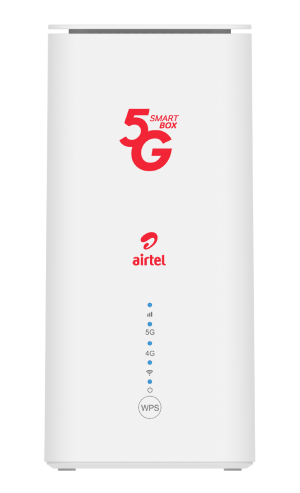

Live the future with Airtel 5G Router
Features of Airtel 5G Router
Explore the Range of Airtel 5G-Compatible Mobile Phones
- Connect your router to the electricity / power.
- Search for the Router Wi-Fi name (Wi-Fi name is at the bottom of the router)
- Enter password (Network SSID is at the bottom of the router)
- Click connect.
- Connect the router to the internet.
- Connect your device (handset / laptop) to the Router.
- Open the web browser and type 192.168.1.1 into the browser URL bar.
- A log in page will appear - enter Login with username: admin, password: admin
- On Left Pannel Select Wi-Fi setting and then select 2.4G Wi-Fi
- Go to SSID box and change Router Name Airtel_X28_XXXX to your preferred name
- Press Save • On Left Pannel Select Wi-Fi setting and then select 5G Wi-Fi Setting
- Go to SSID box and change Router Name Airtel_X28_XXXX to your preferred name
- Press Save.
- Remember this Name: you will need it to login again.
- Connect the router to the internet.
- Connect your device (handset / laptop) to the Router.
- Open the web browser and type 192.168.1.1 into the browser URL bar.
- A log in page will appear – enter Login with username: admin, password: admin
- On Left Pannel Select Wi-Fi setting and then select 2.4G Wi-Fi
- Go to WiFi Password box and enter password of your choice.
- Press Save • On Left Pannel Select Wi-Fi setting and then select 5G Wi-Fi Setting
- Go to WiFi Password box and enter password of your choice.
- Press Save.
- Remember this Password: you will need it to login again.
- Power on the Router
- Find the Reset Hole behind the Router just below the Power cable.
- Insert a Clip, press and hold till it Resets.
- After Reset – username and password would be changed to default.
- Default username: admin and Default password: admin
- Use the default username and password to log in and change them.
- Dial *149*99# from your Airtel line.
- Select 7: HBB/Router/ MiFi
- Select 2: 5G Unlimited
- Select RENEWAL
- Enter account number provided at the time of activating the account.
- Select Plan for your choice.
- Enter Airtel Money PIN to finalise payment.
- Your Plan will be activated immediately.
- Dial *149*99# from your Airtel line.
- Select 7: HBB/Router/ MiFi.
- Select 2: 5G Unlimited.
- Select ADVANCE
- Enter account number provided at the time of activating the account.
- Select Plan for your choice.
- Enter Airtel Money PIN to finalise payment.
- Your Plan will be automatically renewed.
- If you have selected a different plan, it will be changed after the current plan is over.
Click My Account & Enter your Mpesa / Tigo Pesa Number and follow the instructions.
- Dial *149*99# from your Airtel line.
- Select 7: HBB/Router/ MiFi.
- Select 2: 5G Unlimited.
- Select ADVANCE
- Enter account number provided at the time of activating the account.
- Select Plan for your choice.
- Enter Airtel Money PIN to finalise payment.
- Your Plan will be automatically renewed.
- If you have selected a different plan, it will be changed after the current plan is over.
You can buy bundles via USSD by dialing *149*99#, selecting option 7, and entering your device number. Alternatively, use the MyAirtel App or visit airtel.co.tz/prepaid recharge.
This is not recommended. Please use a different Airtel number to purchase plans for your device without removing the SIM card in your device.
You can check your balance for your MiFi bundle via USSD by dialing *149*99#, selecting option 7, then 4, and entering your device number.
When you want to change WiFi name and password:
- Connect your device to the internet,
- Open internet browser and enter this IP address: 192.168.1.1.
- You will be asked to login. Enter username and password written at the bottom of device, usually it is admin/admin.
- Having logged in, go to WiFi settings, select WiFi settings, under "SSID" enter the name you want, and under WiFi Password, enter the password you want, then click "save".
If you have forgotten the password for your 5G device:
- Take your device and look underneath it, you will see a section written “reset” or “restore factory”.
- Once opened, and if having the manual check instructions on how to reset password and do as instructed.
- After password reset, you will use the default password found underneath the router labeled "WIFI KEY".
- For 4G pocket MIFI, open the device and check the word RESET, press the small button to reset the password.
- Wait for the device to reboot, and password to change.
- You will use the default password found underneath the router or MiFi labeled "WiFi KEY"
5G is also known as the 5th generation telecommunication technology that is aimed to deliver higher multi-data speeds, ultra-low latency, increased network capacity and a uniform user experience to multiple users at same time. 5G is up to 100 times faster than 4G in speed and has a high level of performance needed for an increasingly connected society.
- Massive network capacity for multiple users at same time.
- Swift upload and download speed internet access across multiple device and users.
- Ultra-low latency while downloading and uploading rich content, multimedia, and business applications.
- Provides high level of performance needed for the internet of things (IOT).
Your Airtel 4G physical and e-SIMs will be automatically upgraded to 5G however, your device must be 5G compatible
To Check 5G Support for Apple iPhones
- Open the ‘Setting’ Icon on your device.
- Tap on ‘cellular/mobile data’.
- Tap on ‘cellular/mobile data option’.
- Tap on Voice & Data. If you see 5G as an option there, your phone is 5G compatible.
Below are steps to enable your device to 5G and these steps vary, depending on the device type.
For IOS devices:
- Go to Settings > Mobile Data > Mobile Data Options > Voice & Data>5G Auto.
For Android devices :
- Go to Settings > Connections > Mobile Networks > Network Mode> select the network mode with 5G/4G/3G (auto connect)
While 5G is designed to be the next generation of wireless technology, it is not expected to completely replace 4G immediately. Instead, 5G will likely work alongside 4G to offer better overall network performance.
If you leave a 5G coverage area, your device will automatically switch to a compatible network, such as 4G or 3G, depending on what is available. Most modern smartphones are designed to seamlessly transition between different available networks.
Not all Airtel Mifi and Router devices are not 5G compatible. 5G compatible devices are available at any of our Airtel shop. Kindly visit the nearest Airtel shop for more information.
No, at the initial phase, 5G will only be available in specific locations.
Currently there is no specific bundle for 5G. All existing data plans remain
Data consumption is dependent on your usage.
You can check your balance for your MiFi bundle via USSD by dialing *149*99#, selecting option 7, then 4, and entering your device number.